
Solving Storybook's File Inclusion/Exclusion Challenge on the Sidebar
Recently, I built a component library for the Terakota project. I made use of Storybook which stands out as a superb tool for effective documentation and component cataloging. Setting up the storybook in/for an existing project has been heavily treated. I used a pseudo atomic structure in setting up the structure for the component stories architecture. I would focus on issues I faced for which solutions are not readily available on search engines. Storybook is storied for it's ability to handle MDX, JS and TS files as well as other file formats for the effective integration of component stories. However, integrating MDX files into Storybook isn't always straightforward. I'll share challenges I faced with including and excluding specific file types such as MDX in Storybook, the solutions I tried, the errors I encountered, and how I eventually resolved the issue.
- Storybook Version: v7
- Node Versions: v18
- Associated Technologies: React | TypeScript
The Challenge
The goal was simple: configure Storybook to include all MDX files in our project's sidebar, except those beginning with a certain phrase e.g.'codefile'. Subsequently we also discovered ways to exclude other file types or formats in the course of bringing about the solution. This requirement seemed straightforward but led to a significant hiccup in our configuration process.
Initial Setup and Issue
Here’s the initial configuration setup in our .storybook/main.(js/ts) file:
```
stories: [
"../src/**/*.mdx",
"../src/**/*.stories.@(js|jsx|mjs|ts|tsx)",
],
```
Here’s the initial configuration setup in our
.storybook/manager.(js/ts) file:```
```
However, this setup didn’t work as expected. Including the line;
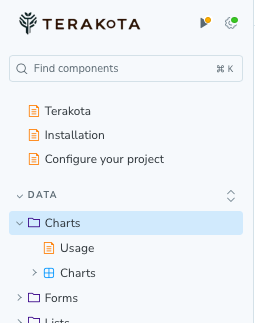
"../src/**/[!codefile]*.mdx", in the stories config of the manager.js file was supposed to exclude files like codefile.mdx but instead, it caused errors and didn't exclude the files correctly.In the Sidebar image below, we have a Story folder; Data/Charts. The Charts stories has two files; Usage.mdx and Charts.ts. The content of the Usage.mdx file is imported into the Charts.ts file as a sub documentation and we would rather not have it appear in the sidebar. Here, we will apply the various code solutions and show you how you can keep the Usage file out of the sidebar OR keep the charts file out of the sidebar.
Troubleshooting and Debugging
Upon encountering errors, we leveraged console logging to understand what files were being processed:
```
const glob = require('glob');
const path = require('path');
// Use an absolute path for clearer debugging
const projectRoot = path.resolve(__dirname, '../src');
const mdxFiles = glob.sync(`${projectRoot}/**/*.mdx`);
console.log("All MDX files found:", mdxFiles);
const filteredMdxFiles = mdxFiles.filter(file => {
const filename = path.basename(file);
const isExcluded = filename.startsWith('usage');
console.log("Testing file:", file, "Excluded:", isExcluded);
return !isExcluded;
});
console.log("Filtered MDX files:", filteredMdxFiles);
const config = {
stories: [
"../src/**/*.stories.@(js|jsx|mjs|ts|tsx)",
...filteredMdxFiles.map(file => path.relative(projectRoot, file)), // Convert back to relative paths
],
};
```
Finding the Solutions
Excluding MDX:
After several trials and understanding more about glob patterns and Storybook’s interpretation of them, we refined our approach. We corrected the path handling by ensuring that paths were transformed relative to the correct base directory:
```
import type { StorybookConfig } from "@storybook/react-webpack5";
...
```
This adjustment ensured that only the intended MDX files were included, and those starting with 'usage' were successfully excluded. This solution also works across most recent versions
of Storybook including version 6.
Excluding .js or other stories: this aspect involved changes to the manager.js file as well as changes to the stories file, in this case; charts.stories.ts.
We included a filer which is seemingly only available in Storybook >=v7, and this filter allows you to add a tag using Storybook's addOn features. When this tag is added to the story,
the story will be automatically excluded from the sidebar. The word tag used for this example is 'pattern'
```
manager.js
...
```
in the charts.stories.ts file, we add the tag like so
```
```
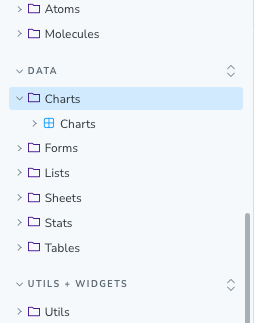
with the tag added, the chats story will now be excluded from the Sidebar.
The below image show the Sidebar without Usage.mdx file post implementation.
Errors and Pitfalls to Avoid
Throughout this process, several key learnings emerged:
- Verify Path Relativity: Always check that paths are correctly relative to where the Storybook configuration expects them to be.
- Glob Pattern Accuracy: Be meticulous with glob patterns, especially when trying to exclude specific files or patterns.
- Compatibility Checks: Keep an eye on dependency versions, especially with major tools like Storybook, to avoid compatibility issues.
Conclusion
The journey to correctly configure Storybook to handle specific MDX files taught us the importance of understanding tooling deeply, particularly in how paths and glob patterns are handled. This experience not only refined our setup but also deepened our understanding of how Storybook integrates with our development environment, leading to more robust and maintainable configurations.
By sharing this story, I hope to assist others facing similar challenges, making their path smoother and their development process more efficient.
You may visit terakota.live and checkout the Storybook to view this implementation.