
DEPLOYING A RUBY ON RAILS APP FOR AWS
- AWS Service: Elastic Beanstalk
- AWS Platform: 64bit Amazon Linux 2/3.6.17
- Rails Versions: v6.0+ to v7.0+
- Ruby Versions: v3.0.4 to v3.2.2
Over the course of time, I have moved several of my applications to the Cloud. One of which is this my blog(Sojourn). While the applications for Cloud technology are vast, this writeup focuses on deployment of a Web Application for the cloud using AWS. I will be narrating my experience in this process from my perspective deploying Rails applications as a Cloud DevOps Engineer specialising in AWS.
The goal? To deploy a Rails application seamlessly onto AWS Elastic Beanstalk using the AWS console, ensuring a smooth transition from development to production without sacrificing performance or stability.
CONTENTS
Introduction - Why AWS?
- Overview of AWS, Ruby on Rails, AWS Elastic Beanstalk, Puma, and Nginx
Setup and Deployment with AWS
- Initial deployment to AWS Elastic Beanstalk
- Setting up a Ruby on Rails application for deployment
- Viewing errors with LogFiles
Encountered Problems and Solutions
- Problem 1: Deployment Failures due to Gemfile Issues
- Solution 1: Cleaning and Specifying Gem Versions
- Problem 2:
assets:precompileTask Failures - Solution 2: Environment Configuration and Precompilation
- Problem: Puma Configuration for AWS
- Solution: Conditional Configuration for Development and Production
- Problem: Nginx Reverse Proxy Configuration
- Solution: Setting Up Unix Sockets and Permissions
Using Github and AWS CodePipeline(CI/CD)
Common Pitfalls and How to Avoid Them
- Understanding AWS Environment Constraints
- Properly Managing Gemfile Dependencies
- Configuring Web Servers for Different Environments
Conclusion
- Summary of Key Takeaways
- Final Thoughts on Rails Deployment to AWS
- Relevant Resources
1. Introduction
Deploying a Ruby on Rails application involves several key components, each with its own set of configurations and challenges. AWS, with its robust ecosystem, promises scalability, reliability, and a suite of services that cater to various deployment needs. For Rails applications, AWS Elastic Beanstalk and its integration with the Puma web server and Nginx reverse proxy form a powerful triad that can handle the demands of modern web applications. While it is possible to deploy such an application via the command line using SSH, we embark on this deployment using the AWS console which is less complex and more suitable for our needs here. Before deploying this particular Rails 6 application on Amazon Linux 2(AL2), I had unsuccessfully attempted to deploy the same on Amazon Linux 2023(AL3) but after several attempts over the span of weeks, I fell back to the deprecated AL2 which i was much more familiar with before finding success. However, I will still need to deploy on AL3 but that upgrade has been tied to the Applications' upgrade to Rails 7 in the future since the AL2 will be phased out in 2025. I will reserve that process for the Part 2 of this writeup. Note that my attempts at AL3 necessitated the dockerization of the app as well as the use of AL3 specific Gemfiles and setup which still very much linger in this deployment, this writeup and subsequent follow up updates.
2. Initial Setup and Deployment
The deployment process begins with setting up the Rails application for deployment, including configuring the Gemfile and ensuring the application is ready for the AWS Elastic Beanstalk environment. Make sure your project starts and runs successfully on your local/development server before proceeding with your production deployment. Below is a sample Gemfile which achieved deployment success for your pleasure.
```source 'https://rubygems.org'git_source(:github) { |repo| "https://github.com/#{repo}.git" }
ruby '>= 3.0.4', '<= 3.2.2'gem 'rails', '~> 6.0.3', '>= 6.0.3.6'gem 'buttercms-rails', '~>1.2.3'# Use sqlite3 is only used for development not for productiongem 'sqlite3', group: :development# Postgres(pg) is used for Production; for it to run locally you need the pg client installed on your desktopgem 'pg'# nio4r gave errors until its version was specified heregem 'nio4r', '= 2.7.1', group: :productiongem 'activerecord'gem 'rake'# Specific use of Puma to get the app to work in production and developmentgem 'puma'# Use SCSS for stylesheetsgem 'sassc-rails', '>= 2.1.0'# Transpile app-like JavaScript. Read more: https://github.com/rails/webpackergem 'webpacker', '~> 4.0'# Ruby 3.2.2 bundle update required this Pysch gem to overcome deployment errors on AWSgem 'psych', '< 4'# Turbolinks makes navigating your web application faster. Read more: https://github.com/turbolinks/turbolinksgem 'turbolinks', '~> 5'# Build JSON APIs with ease. Read more: https://github.com/rails/jbuildergem 'jbuilder', '~> 2.7'#Bootstrap JavaScript depends on jQuery. If you're using Rails 5.1+, add the jquery-rails gem to your Gemfilegem 'jquery-rails'# Reduces boot times through caching; required in config/boot.rbgem 'bootsnap', '>= 1.4.2', require: false# Gem to help manage meta tagsgem 'meta-tags'group :development, :test do# Call 'byebug' anywhere in the code to stop execution and get a debugger consolegem 'byebug', platforms: [:mri, :mingw, :x64_mingw]endgroup :development do# Access an interactive console on exception pages or by calling 'console' anywhere in the code.gem 'web-console', '>= 3.3.0'gem 'listen', '~> 3.2'# Spring speeds up development by keeping your application running in the backgroundgem 'spring'gem 'spring-watcher-listen', '~> 2.0.0'endgroup :test do# Adds support for Capybara system testing and selenium drivergem 'capybara', '>= 2.15'gem 'selenium-webdriver'# Easy installation and use of web drivers to run system tests with browsersgem 'webdrivers'end# Windows and AL platform does not include zone Info files, so bundle the tzinfo-data gemgem 'tzinfo-data', platforms: [:mingw, :mswin, :x64_mingw, :jruby]```
Viewing errors with LogFiles
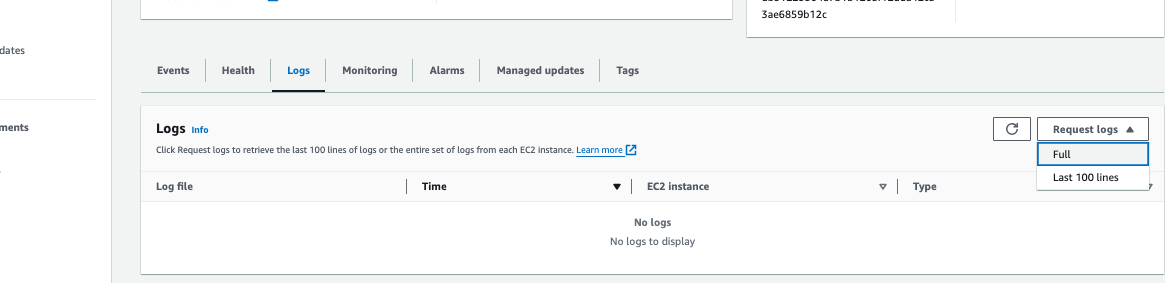
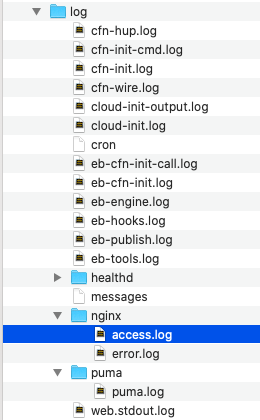
The most effective way to debug AWS deployments is via the logfiles. These log files can be found in your environment(see Image below). While you can view the last 100 lines of the logfiles in the browser, AWS still requires you to download your log file bundles to enable full view of your log files. I found myself doing alot of log bundle downloads since the last 100 lines is sometimes insufficient to identify an error. One would hope that a future AWS console UI will enable a user to view updated full log files in the browser without having to exit the browser environment.
Some popular log files i had to regularly view in order of frequency include;
- eb-engine.log (for general deployment errors),
- cfn-init.log(for prebuild errors associated with your eb-extensions),
- puma/puma.log(for puma errors to confirm if server is responsive) and
- nginx/nginx.log(for nginx error lookup)
3. Encountered Problems and Solutions
Problem 1: Deployment Failures due to Gemfile Issues
Solution 1: It's crucial to ensure that the Gemfile is clean and all dependencies are specified with compatible versions to prevent deployment failures. Some of the Gems required for Rails
Problem 2: assets:precompile Task Failures
Solution 2: Configure the environment properly and ensure all assets are precompiled before deployment. This may involve running precompilation locally or configuring it to run on the server during deployment.
4. Configuring Puma and Nginx
Configuring Puma and Nginx correctly is crucial for the successful deployment of a Rails application on AWS.
Problem: Puma Configuration for AWS
During the deployment process on AWS, a significant hurdle encountered was the configuration of the Puma server in a production environment. The challenge arose when attempting to bind Puma to a Unix socket at /var/run/puma/my_app.sock for communication with Nginx, the reverse proxy server. This setup is typical for production environments to enhance performance and security. However, it led to errors when running the Rails server locally and on AWS.
Example Error:
On AWS, the configuration did not manifest as an error message directly but resulted in a 504 Gateway Timeout error, indicating a failure in communication between Nginx and Puma.
Locally the error manifested as: Exiting ...rvm/gems/ruby-3.2.2/gems/puma-4.3.12/lib/puma/binder.rb:327:in `initialize': No such file or directory - connect(2) for /var/run/puma/my_app.sock (Errno::ENOENT)
Solutions: Use conditional configuration in config/puma.rb to differentiate between development and production environments, especially for Unix socket bindings. The below can be added to your config/puma.rb filerails_env = ENV.fetch("RAILS_ENV") { "development" }if rails_env == "production" bind "unix:///var/run/puma/my_app.sock" pidfile "/var/run/puma/my_app.sock"else port ENV.fetch("PORT") { 3000 }end
Creating a Procfile
There was also a need to create a Procfile at the root of the project to enforce a Puma config creation since AWS sometimes hindered this. In the Procfile we placed the following code to create the Puma config and execute it:web: bundle exec puma -C /opt/elasticbeanstalk/config/private/pumaconf.rb
Problem: Nginx Reverse Proxy Configuration
The configuration of Nginx as a reverse proxy to forward requests to the Puma server via the Unix socket posed another challenge. The 504 Gateway Timeout error in production was a symptom of misconfiguration or the absence of the Unix socket Puma was supposed to bind to.
Solution: The solution involved ensuring that Nginx was correctly configured to proxy requests to the Unix socket at /var/run/puma/my_app.sock. This required verifying the Nginx configuration files and ensuring they pointed to the correct socket path. Moreover, the .ebextensions script mentioned earlier played a crucial role in creating the necessary directory structure and permissions for the socket file, allowing both Puma and Nginx to communicate effectively.
Using Github and AWS CodePipeline(CI/CD)
Continuous Integration and Continuous Deployment (CI/CD) allow for the automation, testing and deployment of applications in a fluid manner. AWS CodePipeline, in conjunction with GitHub, provides a powerful platform for implementing CI/CD for Ruby on Rails applications. Every time there is a code change AWS CodePipeline automates the build, test, and deployment phases of your application. This section assumes you have a Ruby on Rails application hosted on GitHub and aims to deploy it using AWS Elastic Beanstalk. The stages involve;
- Create a New Pipeline
- Source Stage : Here we use Github version 2, connect to our Github account and add the desired Repo and Branch
- Build Stage
We Skip the build stage here since our build process is described in our project files
- Deploy Stage: Our deployment provider is Elastic Beanstalk, we select the region of our project and select the application and environment name
- Review and Create
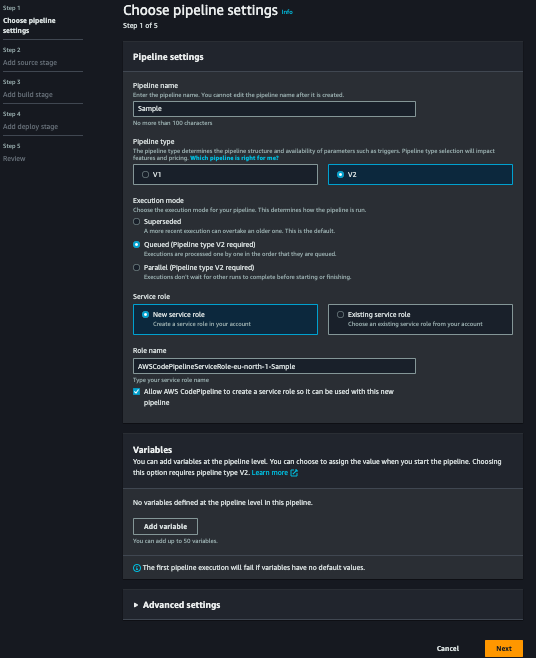
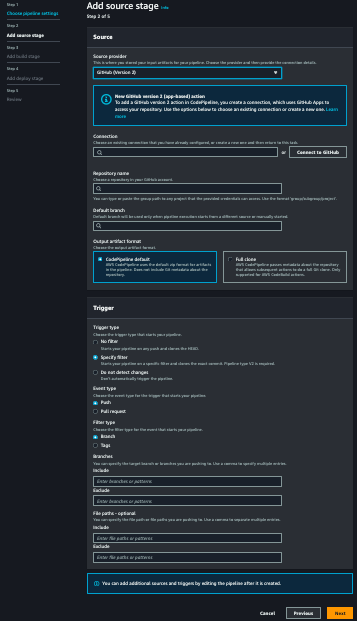
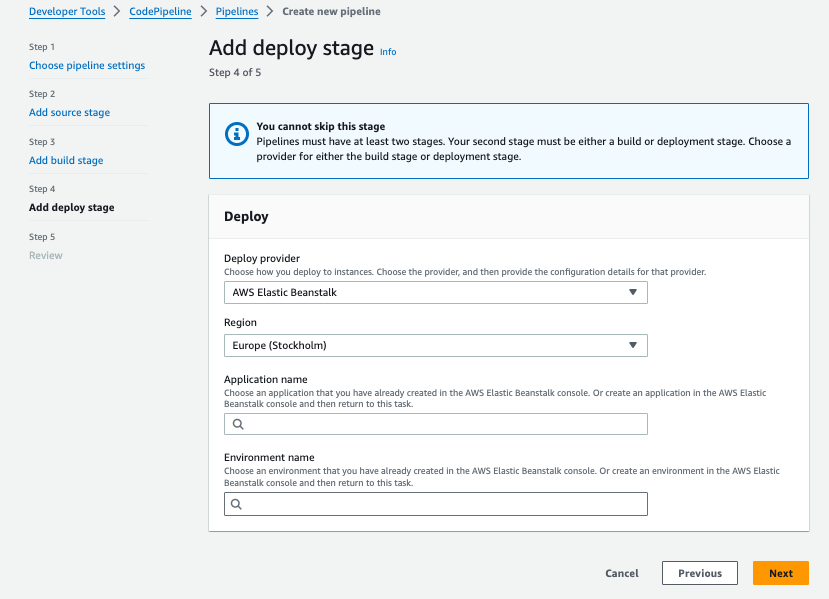
We review all the details provided and proceed to Create the pipeline
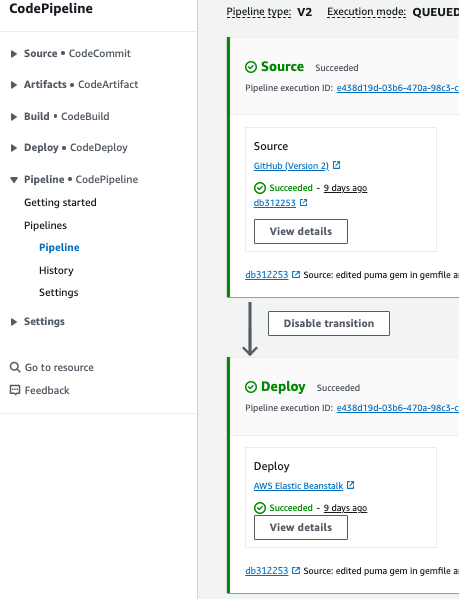
Finally our app begins the process of deployment and a successful deployment looks like the image below
5. Common Pitfalls/Errors and How to Avoid Them
- Understanding AWS Environment Constraints: Be aware of the AWS environment's limitations and configurations, such as directory paths and user permissions.
- Properly Managing Gemfile Dependencies: Keep the
Gemfileclean and ensure all dependencies are compatible. - Configuring Web Servers for Different Environments: Use conditional logic in server configuration files to adapt to different environments seamlessly.
6. Conclusion
Deploying a Ruby on Rails application to AWS Elastic Beanstalk with Puma and Nginx involves understanding and navigating through a series of challenges. By addressing these challenges with the solutions provided, developers can ensure a smoother deployment process and a more robust application environment. This journey underscores the importance of meticulous configuration and an in-depth understanding of both the application's and environment's requirements.
Summary of Key Takeaways
Deploying a Ruby on Rails application to AWS Elastic Beanstalk involves several critical steps and considerations that can significantly impact the success and reliability of your application in a production environment. Here are the key takeaways from our discussion:
-
Proper Gemfile Management: Ensuring your
Gemfileis correctly managed by specifying gem versions and resolving dependencies is crucial to prevent deployment failures. -
Effective Use of Environment Variables: Leveraging environment variables for configuration settings enables smoother transitions between different environments (development, test, production) and enhances security.
-
Asset Precompilation: Understanding and implementing the asset precompilation process is essential for Rails applications to ensure assets are served correctly in production.
-
Database Migration: Automating database migrations as part of the deployment process ensures your database schema is always in sync with your application's expectations.
-
Conditional Puma Configuration: Setting up Puma with conditional configuration for development and production environments allows for flexibility and prevents deployment issues related to web server configurations.
-
Integrating CI/CD with GitHub and AWS CodePipeline: Automating the build, test, and deploy phases through CI/CD pipelines not only saves time but also reduces the risk of human error, ensuring a more reliable deployment process.
RELEVANT RESOURCES
Some of the relevant resources i used to overcome some pitfalls and errors are listed here below for your use. For further exploration in overcoming potential issues and to deepen your understanding of deploying Ruby on Rails applications to AWS, the following resources can be invaluable:
- https://www.stackoverflow.com/questions/40938155/right-way-to-deploy-rails-puma-postgres-app-to-elastic-beanstalk
- https://stackoverflow.com/questions/39525129/installing-gems-fails-in-deployment-aws-elastic-beanstalk
- https://stackoverflow.com/questions/73012901/deploying-rails-7-app-on-elastic-beanstalks-fails-with-nokogiri-error
- https://stackoverflow.com/questions/72307187/how-to-install-postgresql-client-to-amazon-ec2-linux-machine
- https://stackoverflow.com/questions/65544527/aws-elastic-beanstalk-ruby-on-rails-6-app-deployment-error-with-nginx
- https://stackoverflow.com/questions/30355569/rails-application-deployed-on-elastic-beanstalk-with-puma-fails-502-errors-on/69092359#69092359
- https://stackoverflow.com/questions/66400979/why-am-i-getting-502-bad-gateway-nginx-1-18-0-rails-app-on-elastic-beanstalk
- https://medium.com/swlh/what-should-you-know-about-deploying-a-rails-app-on-aws-elastic-beanstalk-fa47b9d834ed
- https://medium.com/@williamjoshualacey/deploy-rails-app-to-aws-2854b2338708
- https://medium.com/@rachelchervin/aws-elastic-beanstalk-gotchas-with-rails-d23ac21487f7
- https://www.codewithjason.com/deploy-ruby-rails-application-aws-elastic-beanstalk/
- https://bentranz.medium.com/deploy-ruby-on-rails-application-to-aws-elastic-beanstalk-amazon-linux-2-138654b1ce41
- https://bentranz.medium.com/setup-continuous-deployment-pipeline-for-aws-elastic-beanstalk-5f8edb38d872
- https://www.honeybadger.io/blog/rails-6-aws-elastic-beanstalk/
- https://repost.aws/questions/QUvEtL971cSsK0x0De-OTljw/how-can-i-deploy-a-rails-app-slite3-to-aws
- https://docs.aws.amazon.com/elasticbeanstalk/latest/dg/ruby-rails-tutorial.html
- https://dev.to/forksofpower/make-the-move-from-sqlite3-to-postgres-in-rails-6-34m2
- https://copyprogramming.com/howto/deploy-rails-app-from-github-to-aws-elastic-beanstalk
- https://dev.to/sname/deploy-rails-app-from-github-to-aws-4kk0
- https://semaphoreci.com/community/tutorials/how-to-deploy-a-ruby-on-rails-application-to-elastic-beanstalk-with-semaphore
- https://benreynolds4.medium.com/gateway-timeout-deploying-rails-application-to-elastic-beanstalk-88bc8a0c9833
- https://www.zshawnsyed.com/2020/06/10/deploying-to-aws/
- https://www.zshawnsyed.com/2020/06/02/setting-up-aws/
- https://www.freecodecamp.org/news/how-to-deploy-a-rails-5-2-postgresql-app-on-aws-elastic-beanstalk-34e5cec3a984/